 Jetpack VaultPress Backup
 The best real‑time WordPress backup plugin
Save every change and get back online quickly with one‑click restores from VaultPress Backup.

Take a walkthrough of VaultPress Backup
VaultPress Backup is the most proven WordPress backup plugin with 269 million site backups over the last ten years
-
Get Backup
VaultPress Backup
50% off *$$Save every change with real‑time backups and get back online quickly with one‑click restores.
- Real-time cloud backups
- Starts with 10GB of backup storage
- 30-day archive & activity log*
- One-click restores
* Subject to your usage and storage limit.
-
Get Security
Security
50% off *$$Easy-to-use, comprehensive site security.
Includes VaultPress Backup, Jetpack Scan, and Akismet.- Starts with 10GB backup storage
- Comment and form spam protection (10k API calls/mo)
- 30-day activity log
- Real-time cloud backups
- Unlimited restores
- Website firewall (WAF)
- Real-time malware scanning
- One-click fixes
- * Discount is for the first year only, all renewals are at full price.
If your host’s servers go down, you’re covered.
Host backups offer some protection but may not be sufficient to fully safeguard your valuable data. They often have limitations, such as single daily backups only, on-site storage, and clunky interfaces.
Unlock the VaultPress Backup advantage:
- Unmatched Security: Safeguard every change in real-time in the ultra-secure Jetpack Cloud
- Instant Recovery: Restore your site even when your host is down.
- Backups built specifically for WordPress and WooCommerce sites.

Restoring your site has never been easier
If you make money from your site, or spend hours perfecting content, you need WordPress backups. Protect your investment by getting your site back online in seconds. Our automated backup plugin is powerful enough for pros, but easy enough for beginners.
- Easy-to-use plugin with one-click restores
- Restore from anywhere with the Jetpack mobile app
- Restore even if your site is offline
- No developer required
- Best-in-class support

Millions of people depend on my site, and downtime isn’t an option. Jetpack VaultPress Backup handles my site security and backups so I can focus on creation.

Reliability you can trust
Jetpack VaultPress Backup is built on WordPress.com’s world-class infrastructure, so you can be sure your site is safe and can be recovered at any moment. Host backups are often time-consuming and require technical expertise to restore. You’ve got more important things to do.
- Backups of all files including database backups and file backups
- Backups of all WooCommerce customer and order data
- Redundant copies made globally on multiple servers
- Off-site / cloud backups so there’s no load on your server
- Global server infrastructure
- Tested to ensure no conflicts with major plugins or hosts
- Backups are encrypted, keeping your data secure

Backups built for WooCommerce
Backups are essential for eCommerce stores. New orders come in at any moment, so you need a plan to keep your order and customer data safe. That’s why we designed the Jetpack VaultPress Backup plugin specifically with WooCommerce in mind.
- Restore your site to any past state while keeping all orders and products current
- Protect your customer data and stay GDPR compliant
- Custom WooCommerce table backups
A must-have for WordPress site builders
Save hours of time developing and maintaining sites by restoring to any point. Just one change pays for itself. Real-time backups go beyond a snapshot to give you total power and flexibility. The activity log lets you know exactly what action (and who) broke the site, so you can look like a pro for your clients.
- Full and differential backups in real-time
- Complete list of all site changes
- Quickly restore from any point

Our developers use VaultPress Backup all the time. It’s a one-click way to return to where we were before things got wonky. It gives us a little emergency parachute so if we’re working on a customization that breaks everything, we lose minutes, not hours.
Read more about how FreshySites uses VaultPress Backup to protect 1,200 WordPress sites

The price is right
-

Cloud backups
-

Unlimited restores
-

Unlimited site migrations
-

Includes WooCommerce support
-
Get Backup
VaultPress Backup
50% off *$$Save every change with real‑time backups and get back online quickly with one‑click restores.
- Real-time cloud backups
- Starts with 10GB of backup storage
- 30-day archive & activity log*
- One-click restores
* Subject to your usage and storage limit.
-
Get Security
Security
50% off *$$Easy-to-use, comprehensive site security.
Includes VaultPress Backup, Jetpack Scan, and Akismet.- Starts with 10GB backup storage
- Comment and form spam protection (10k API calls/mo)
- 30-day activity log
- Real-time cloud backups
- Unlimited restores
- Website firewall (WAF)
- Real-time malware scanning
- One-click fixes
- * Discount is for the first year only, all renewals are at full price.
Understand every site change
The activity log gives you the power to quickly see every site change including the time and person who made it. Pair with real-time backups to make debugging and restoring your site to a specific moment a breeze.
- See the last 20 events for free
- 30-day or 1-year archives with paid plans
- Access your activity log from anywhere with the Jetpack mobile app
- Full list of monitored activities

Migrate your WordPress site in minutes
Don’t let a bad host keep your site hostage. Jetpack VaultPress Backup is also a WordPress migration plugin, so you can transfer your entire database, plugins, settings, and themes, as well as all your content and images.
- Migrate your WordPress site to any host
- Included in every backup plan
- No developer required

Looking for complete security?
Is your site too valuable to lose? Get an all-in-one security solution with malware scanning, downtime monitoring, brute force attack protection and comment and form spam protection.
Secure your site
Frequently Asked Questions
How do I restore my site with VaultPress Backup?
How do I restore my site with VaultPress Backup?
It’s easy to restore your site in just a few clicks. Check out this quick video for more detail.
For more detailed assistance, check out the full support article.
Why do I need backups?
Why do I need backups?
Doesn’t my host already have backups?
Doesn’t my host already have backups?
Most hosts have some sort of backup. But they are often infrequent and difficult to restore. If your site goes down, you need access to your backups. If they’re stored on your hosting platform (or your hard drive!), and your files are compromised, your database backup could be compromised too.
Jetpack’s off-site backup storage allows you to restore a clean version of your website even if you can’t log in. When you rely solely on your host’s built-in backups, you’re putting all your eggs in one basket. Here is one story from a Jetpack customer of what can happen. Without a third-party backup that copies your files off-site, your website could be at risk. One false move by you or your host could compromise your web files or delete them entirely.
How do I create a WordPress backup for my site?
How do I create a WordPress backup for my site?
If you don’t have Backups as part of your Jetpack plan, go to your WordPress admin dashboard and then go to Jetpack > Dashboard > Plans.
As soon as you purchase VaultPress Backup, it will be activated, and the first backup will be completed. There are barely any settings to configure, and you don’t need coding experience.
You’ll know your WordPress backup has been created if you see a Backup complete event in the activity log.

By clicking the three-dot ellipsis to the right of the description, you can see the download and restore options.
Don’t see your WordPress backup in the activity log?
Don’t see your WordPress backup in the activity log?
If you notice that backups are not being saved yet, update your site credentials. Go to Manage > Settings > Jetpack. You should see a form that allows you to add your site credentials.
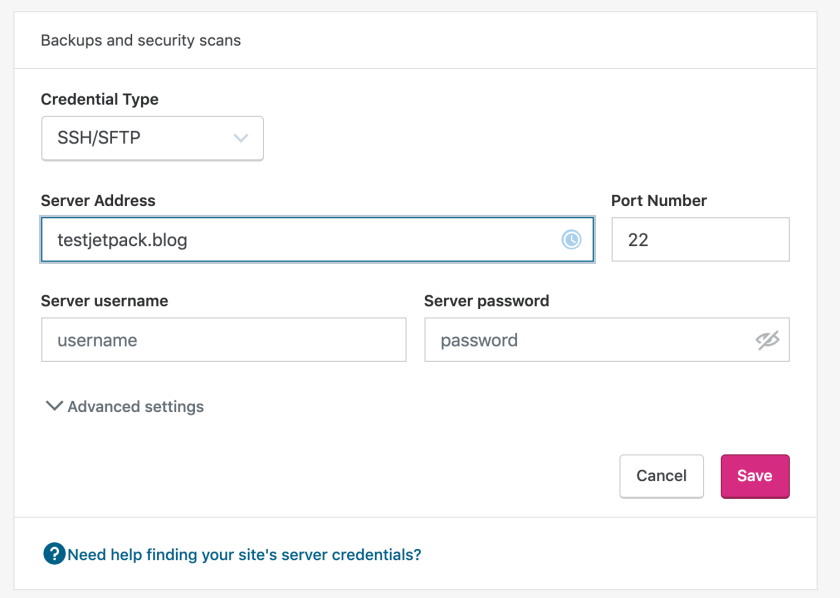
If Jetpack cannot make contact with your site and it’s not able to create backups, you’ll receive an email after two failed attempts.
Can I use VaultPress Backup to migrate my website to a different host?
Can I use VaultPress Backup to migrate my website to a different host?
Yes! VaultPress Backup is also a WordPress migration plugin, so you can migrate your site to a new WordPress install on any server. This is helpful if you decide to move to a new host. For more details, visit the support page.
Can VaultPress Backup be used to migrate to a different address?
Can VaultPress Backup be used to migrate to a different address?
Yes, just enter the server credentials for the new site address. These are the credentials that Jetpack will use to clone your site from your current host to your new host. If you’re confused about what these credentials are, how they work, or why we need them, you can read more about that in our SSH, SFTP, FTP Credentials guide.
Does VaultPress Backup take care of all the path changes with an address migration?
Does VaultPress Backup take care of all the path changes with an address migration?
Yes. VaultPress Backup is a WordPress migration plugin, so just enter the destination WordPress path. This is the path in which your site’s files are stored relative to where the SSH, SFTP or FTP user has access. For more details, visit the support page.
Can I clone my website with VaultPress Backup?
Can I clone my website with VaultPress Backup?
Yes! VaultPress Backup lets you copy your site to any server. This is helpful if you want to create a copy of your site on your current server to use for testing and development. For more details, visit the support page.
Can I use Jetpack to back up my database?
Can I use Jetpack to back up my database?
Yes, the VaultPress Backup plugin backs up your WordPress database. Specifically, any tables that begin with your WordPress table prefix and also have a unique key or primary key. For more details, visit the support page.
Can I use Jetpack to back up my files?
Can I use Jetpack to back up my files?
Yes, the VaultPress Backup plugin backs up your WordPress database. This includes all files in the plugins, mu-plugins, themes, and uploads directories. For more details, visit the support page.
Can I use Jetpack to back up my site without plugins?
Can I use Jetpack to back up my site without plugins?
Yes. We will exclude any directory containing a file named .donotbackup. If need be, you can create these files yourself to intentionally prevent certain directories from being backed up. If a directory named donotbackup is added, we will also exclude all files inside that directory. For more details, visit the support page.
Can VaultPress Backup save files to Google Drive or Dropbox?
Can VaultPress Backup save files to Google Drive or Dropbox?
VaultPress Backup doesn’t support saving files directly onto Google Drive or Dropbox. We provide free storage on our servers, saved redundantly in multiple locations around the globe. If you’d like to retain a copy, you can download your backup and upload to a third-party site.
Can I download my backups?
Can I download my backups?
Yes. To download your backup, open your activity log. Use the filters to find the event that you’d like to use, then click the ellipsis (three dots) icon, and choose Download backup. For more details, visit the support page.
Does VaultPress Backup support WordPress multisite?
Does VaultPress Backup support WordPress multisite?
No, VaultPress Backup does not currently support WordPress multisite.
Does VaultPress Backup support split site or split home URLs?
Does VaultPress Backup support split site or split home URLs?
No, VaultPress Backup does not currently support split site or split home URLs.
Is there a backup size limit?
Is there a backup size limit?
No. With VaultPress Backup, there is no backup size limit. If a backup takes you over the limit for your total storage, we will warn you before making any changes to your service.
Peace of mind starting at $4.95 per month
Back up your site